Friday, May 27, 2011
Advantages Of Powerpoint Presentation Formats
It is very important to save you powerpoint presentation in different files. It is a huge advantage to save your presentation as, for example, .htm, .ppsx, .PDF, and .mov files. Here is why.
When you save your presentation, you should have the different files saved just incase you lose you information or if you want to view it in different ways. For instance, when you save it as .htm, you can only view it on the web. If you save it as .PDF, then you can only see it as a print view and you can print the powerpoint easier. If you save it as a .ppsx, you can only view it as a show. The show is an advantage because it is a shortcut to go straight to the powerpoint slideshow. If you save the file as a .mov, you can only see the slideshow played as a movie and does not stop, unless you press pause.
These are advantages because you are able to see the powerpoint show in different ways and it is more convenient. They are advantages by seeing them easier in anyway you like.

Tuesday, April 26, 2011

Workbook

Composed of one or more worksheets and additional Visual Basic for Applications code. The RealCost software is a workbook.

Theme

A preset package containing graphical appearance details, used to customize the look and feel of (typically) an operating system, widget set or window manager.
Table Styles

Statistical Functions
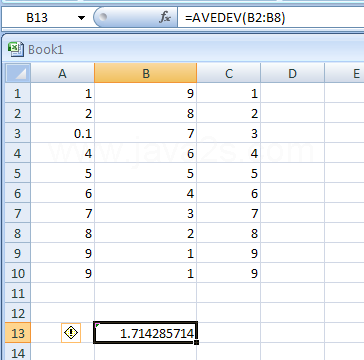
Can be used to analysis the data in a spreadsheet. For example, they can be used to tell you the number of data entries you.
Spreadsheet

A computer application that simulates a paper, accounting worksheet. It displays multiple cells that together make up a grid consisting of rows and columns, each cell containing either alphanumeric text or numeric values.

Smartart

Microsoft Office 2007 (officially called 2007 Microsoft Office System) is the most recent Windows version of the Microsoft Office System, Microsoft's productivity suite. Art you can create.
Sheet Tab


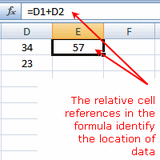
Relative Cell References

A relative cell reference identifies the location of a cell or group of cells.

Order Of Evaluation

Most operators do not guarantee a particular order of evaluation for their operands.


Mixed Cell Reference

In Excel cell references are used in formulas, functions, charts, and other Excel commands.
Microsoft Excel

A spreadsheet application written and distributed by Microsoft for Microsoft Windows and Mac OS X. It features calculation, graphing tools, pivot tables and a macro programming language called VBA (Visual Basic for Applications).
Subscribe to:
Posts (Atom)